
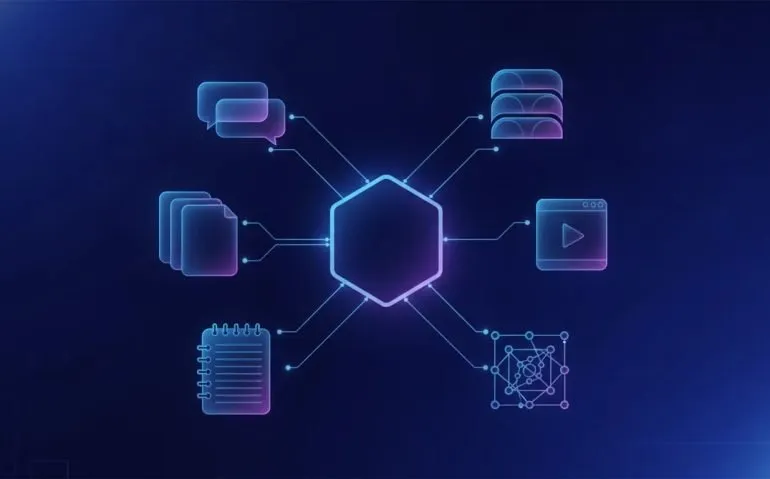
YouMind is an AI workspace built for anyone tired of juggling tabs, subscriptions, copy and paste workflows, and scattered research. If your process looks like 47 browser tabs, unread PDFs, saved videos, random notes, and a ChatGPT chat where you keep pasting context back in, this is the kind of tool that can completely change how you work.
The big idea is simple. Instead of moving between ChatGPT, NotebookLM, Perplexity, research tools, slide tools, video generators, and note-taking apps, YouMind puts the entire workflow into one visual workspace.
You can save information from across the internet, organize it in boards, research topics using multiple AI models, chat with your sources, and transform the results into articles, slide decks, podcasts, narrated presentations, webpages, and videos. The best part is that the context stays together.
This is not just another AI chatbot. It is closer to an AI-powered knowledge base and content-production system combined.
Table of Contents
- Why the Usual AI Research Workflow Is Broken
- What YouMind Can Do in One AI Workspace
- Building a Research Board: The TikTok Algorithm Example
- From One Research Document to Slides, Podcasts, and Video
- Use Case 1: Create an Entire YouTube Video Package
- Use Case 2: Repurpose Research Into a Week of Content
- Use Case 3: Build Custom AI Skills for Repeatable Work
- Why YouMind Is More Than a ChatGPT or NotebookLM Alternative
- Start Building a Better AI Research Workflow
Why the Usual AI Research Workflow Is Broken
The old workflow is painfully familiar. You find a useful article, open a few more tabs, search for videos, download a PDF, take notes somewhere else, then paste parts of everything into ChatGPT and hope it understands what you mean.
That process creates a few major problems:
- Context gets lost. Each tool only sees part of the work.
- Research becomes fragmented. Important sources are scattered across tabs, bookmarks, files, and chats.
- Creating content takes longer than it should. You repeatedly move information between tools before you can create anything useful.
- Subscriptions pile up. Research, writing, slides, images, and video often mean paying for separate products.
- Good ideas disappear. Without a central place for research, you end up redoing work you already completed.
YouMind is designed to consolidate that entire mess. It gives you a single place where your research, source materials, AI tasks, outputs, and creative assets can live together.
What YouMind Can Do in One AI Workspace
At the centre of YouMind is the board. A board is a workspace for a topic, project, client, content idea, or research question. You might build one for the TikTok algorithm, a new product launch, AI news, a video series, or a major business decision.
Inside that board, you can bring in information from several places, including:
- Uploaded files and PDFs
- Saved webpages
- YouTube videos
- Browser content through the Chrome extension
- Notion and connected tools
- Existing YouMind files and boards
Once your materials are in the board, YouMind can analyze them and help you create from them. Its available skills include writing, image creation, slide generation, video generation, webpage creation, and deep research.
You can choose an automatic model option or select from different AI models as needed. One especially useful feature is the ability to switch models during a chat without throwing away the existing project context. That matters when you want to compare approaches or use a different model for a particular part of the task.
Building a Research Board: The TikTok Algorithm Example
A great example of how this works is researching a topic like the TikTok algorithm. Start a new board, name it, and give YouMind a direct prompt such as: learn everything there is to know about the TikTok algorithm.
Rather than treating research as a one-off chat, YouMind keeps the resulting work inside the board. That means the research report, source materials, clips, takeaways, notes, generated images, and final content pieces can all remain connected.
Capture Sources Directly From Your Browser
The Chrome extension is where this becomes incredibly useful. When you find a relevant YouTube video or article, you can save it directly to the appropriate board.
For video sources, YouMind can organize the material with timestamps, selected moments, and key takeaways. You can then interact with the source in several ways:
- Chat with the video
- Select and annotate important sections
- Bookmark useful material
- Capture part of the content
- Translate content
- Rate sources in batches
- Find related media
The same process applies to articles. Save a useful webpage, and YouMind can pull out the core information in a way that is much easier to reuse later. Instead of reopening a dozen tabs to remember where something came from, the source lives inside the project where you need it.
Turn Saved Sources Into Cited Research
Once the board contains enough material, YouMind can generate a detailed research report. In the TikTok algorithm example, the output becomes a comprehensive report with inline citations, key findings, and additional reading.
This is huge if you do deep research. A useful report needs more than a wall of AI-generated text. You need to be able to trace claims back to sources, explore a specific section in more detail, and keep refining the document without rebuilding the project from scratch.
The generated document can also be edited directly. You can adjust the style, font, and formatting, translate it into other languages, and insert elements such as:
- Callouts
- Images and AI-generated images
- Videos and attachments
- Links to relevant content
- Code blocks
- Tables, dividers, Mermaid diagrams, and formulas
That is why YouMind can replace a large part of a NotebookLM-style research workflow. It does not stop at source analysis. It lets you take the research all the way to a polished output.
From One Research Document to Slides, Podcasts, and Video
Research is only valuable if you can turn it into something useful. This is where YouMind gets ridiculous.
From a single research document, you can create a podcast-style quick listen, a presentation, a webpage, a video, or other formats. You can export files in different formats, copy them in different formats, and even send an article to X.
For example, take the TikTok algorithm research report and ask for an eight-slide presentation. YouMind first creates an outline, which you can review and adjust. Once the outline looks right, choose a visual style and let it build the deck.
The resulting slideshow can be edited in detail, including image layers. You are not trapped with a basic output. You can batch edit, refine the design, export it, or use presentation mode.
Suggested visual: Include an image of a research board connected to a report, presentation, podcast, and short-form videos. Use alt text: “AI workspace turning research into slides, podcast, and social video content.”
Use Case 1: Create an Entire YouTube Video Package
One of the strongest use cases is creating a complete YouTube video package from your existing sources.
Say you are making a video about the latest NotebookLM changes. Normally, you might have a product update article open, several videos from other creators, notes in another app, and a ChatGPT prompt where you manually paste everything in.
With YouMind, add those sources to a board and give it a clear instruction. For example:
“Create a YouTube video package about the latest NotebookLM changes. Include title ideas, a description, tags, and a script for a video around 10 minutes long. Use my attached sources, and find important angles that other coverage did not include.”
That last instruction is key. You do not want recycled content that simply repeats what everyone else already said. You want the research to identify gaps, overlooked details, or a more useful angle.
The completed package can include:
- Recommended video titles and alternative title options
- A video description
- Relevant tags
- A structured script
- Timestamps
- Source references
This collapses a multi-tab, multi-tool workflow into one task. You still need your judgment, voice, and final creative decisions, but the heavy lifting becomes dramatically faster.
Use Case 2: Repurpose Research Into a Week of Content
Here is where a research board becomes a content machine.
Take one solid piece of research, such as a report on the TikTok algorithm, and turn it into multiple assets. You can generate a quick-listen audio piece, transform the research into a slideshow, narrate that slideshow directly in the workspace, and use the deck or source document to produce short-form videos.
For the video outputs, YouMind can create multiple individual pieces from the core research. You can choose options such as model, quality, and aspect ratio, or leave those choices on automatic.
The result can be a complete repurposing system:
- Create or collect research in a board.
- Generate a comprehensive research document with sources.
- Turn the document into a slide deck.
- Create a quick-listen podcast version.
- Generate several short-form video concepts from the same resource.
- Use the assets across TikTok, Instagram, YouTube Shorts, Facebook, and other platforms.
One research project can become more than six pieces of content, including a podcast and several videos. Instead of constantly hunting for new topics, you can get far more value from the work you have already done.
Use Case 3: Build Custom AI Skills for Repeatable Work
The third use case is one of the most powerful: creating a custom skill that performs a repeatable task for you.
Think about a recurring research job. Maybe you want to track the latest updates to Google Gemini, ChatGPT, and Claude. You could create an AI research skill with instructions to find the changes from the previous 24 hours and produce a sourced research report.
When creating a skill, you can name it, define what it should do, add an input hint if needed, provide a description, and attach showcase materials such as images or videos. YouMind can also help pre-write the description and input hint.
Once the skill is created, run it to test the output. A strong AI research skill can establish a research plan, determine the questions to investigate, consult a wide range of sources, and organize findings into an executive summary with sections for each platform.
For an AI update report, that could include:
- An executive summary
- Google Gemini updates and sources
- ChatGPT updates and sources
- Claude and Anthropic updates and sources
- A clear breakdown of what changed
Schedule the Skill So It Runs Automatically
The real win is scheduling. Once the result looks good, you can ask YouMind to schedule the skill to run on a recurring basis, such as every Monday at 9 a.m.
Now you are not relying on memory or manually recreating the same research prompt every week. Your custom AI skill has a defined job, a schedule, and a delivery destination.
This is a major difference between an AI workspace and a simple chat tool. A chat gives you answers. A well-built workspace gives you repeatable systems.
Why YouMind Is More Than a ChatGPT or NotebookLM Alternative
ChatGPT is useful. NotebookLM is useful. Perplexity is useful. But using each one separately often means becoming the human bridge between every tool.
YouMind is built around a different approach. It brings sources, research, model access, creative generation, organization, and automation into one system.
The biggest advantages are:
- One location for context: Keep source material and outputs inside the same board.
- Research with citations: Build reports that link findings back to sources.
- Multi-format creation: Transform research into writing, decks, audio, webpages, and video.
- Flexible AI models: Use automatic selection or choose models as needed.
- Browser-based capture: Save useful material from the internet directly into your knowledge base.
- Reusable skills: Turn recurring tasks into custom workflows.
- Scheduling: Automate repeatable research jobs instead of manually restarting them.
If you are already paying for a stack of disconnected AI tools, it is worth asking whether your current workflow is actually helping you move faster or just giving you more tabs to manage.
Start Building a Better AI Research Workflow
The easiest way to see the value is to start with one board. Choose a topic you already need to research, save a few relevant articles and videos, and ask YouMind to produce a sourced report. From there, turn the report into a presentation, podcast, or content package.
Do not overcomplicate it. One board, one real project, one workflow you are currently doing manually. That is enough to see whether an all-in-one AI workspace can remove the friction from your process.
Ready to replace the copy-and-paste chaos? Start building your first YouMind board for free through the YouMind pricing page. The linked offer includes 50% off the Pro 1 monthly plan or 20% off the yearly plan if you decide to upgrade.
For more AI tool workflows, research systems, and practical AI content strategies, explore Rob The AI Guy.
Category: AI Tools
Tags: YouMind, AI workspace, AI research, NotebookLM alternative, ChatGPT alternative, content repurposing, AI video creation, custom AI skills
Frequently Asked Questions
What is YouMind?
YouMind is an AI workspace that brings together research, source saving, multi-model AI chat, writing, presentations, podcasts, video generation, and custom AI skills inside organized boards.
Can YouMind replace NotebookLM and ChatGPT?
YouMind can handle many workflows normally spread across NotebookLM, ChatGPT, research tools, and content-generation platforms. It combines source-based research, citations, chat, content creation, and automation in one workspace.
How does the YouMind Chrome extension help with research?
The Chrome extension lets you save webpages and YouTube videos directly into a YouMind board. Saved content can then be analyzed, summarized, annotated, translated, and used in research reports or other generated assets.
Can YouMind turn research into social media content?
Yes. A research document can be transformed into slides, quick-listen audio, narrated presentations, and multiple short-form videos for platforms such as TikTok, Instagram, YouTube Shorts, and Facebook.
What are custom skills in YouMind?
Custom skills are reusable AI workflows you define for recurring jobs. For example, you can create a skill that researches recent updates to Google Gemini, ChatGPT, and Claude, generates a sourced report, and runs on a recurring schedule.





