
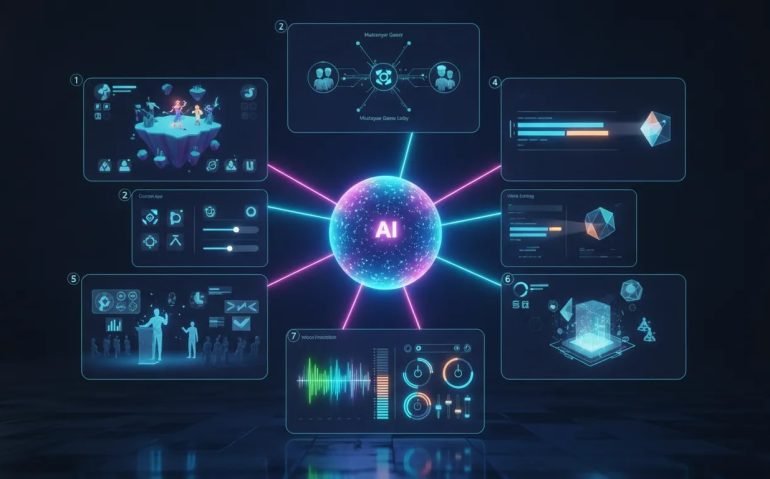
ChatGPT-6 Astra is not just a model for writing a few emails or brainstorming ideas. The capabilities being demonstrated here are honestly crazy. We are talking about creating interactive worlds, multiplayer-style video games, custom apps, polished videos, consulting-style presentations, 3D real-estate mockups, and even music production workflows from natural-language instructions.
The biggest shift is this: instead of asking AI for isolated answers, you can start treating it like an operator. Give it a real objective, access to the right tools, a clear outcome, and enough context to execute. That is where ChatGPT-6 Astra becomes incredibly powerful.
Here are seven ways to push ChatGPT-6 Astra far beyond basic prompting and use it like a pro.
- 1. Create Living Civilizations and Interactive Video Games
- 2. Build Custom Apps and SaaS Tools in Minutes
- 3. Automate Email, Subscriptions, Client Updates, and Admin Work
- How to Configure ChatGPT-6 Astra for Better Results
- 4. Turn AI Avatars Into Fully Edited Video Content
- 5. Create Research-Backed McKinsey-Style Presentations
- 6. Generate 3D Real Estate Mockups From a Listing
- 7. Create Music Through Ableton Integration
- Use Automation Builders to Find What You Should Delegate
- The Real Opportunity With ChatGPT-6 Astra
1. Create Living Civilizations and Interactive Video Games
One of the wildest examples is using ChatGPT-6 Astra to generate a living simulation. Rather than producing a static visual or a simple prototype, the model can be used to create a world populated with residents, animals, resources, and ongoing interactions.
In the example, the world included 12 residents, deer, wolves, cows, and carcasses. A free camera made it possible to move around the environment and inspect what was happening. The point was not simply that the environment looked good. The impressive part was that it appeared to operate like a real system, with different entities coexisting and interacting inside the world.
That opens up a completely different category of creative work. Instead of hand-building every rule, asset, and interaction from scratch, creators can begin with a high-level concept and use AI to help establish the foundation.
From simulation to game creation
The same idea applies to games. An example showed a Call of Duty-style game experience created from a single prompt, complete with player setup options, loadout selection, deployment controls, and gameplay.
Again, the important takeaway is not that every generated game will instantly match the production level of a major studio. It is that the distance between an idea and a playable concept is getting dramatically shorter.
With a capable AI model, you can potentially create a playable starting point, then iterate through conversational instructions such as:
- Improve the visual style and lighting.
- Add a different weapons system or player loadout.
- Change the map into a city, forest, or futuristic arena.
- Create multiplayer functionality for several players.
- Adjust movement, difficulty, controls, or game objectives.
This is huge for game concepts, product demos, training simulations, educational experiences, and internal prototypes. You no longer need to wait until every detail is perfect before testing whether an idea is actually fun or useful.
2. Build Custom Apps and SaaS Tools in Minutes
One of the most practical ChatGPT-6 Astra use cases is app development. If there is a tool you wish existed for your business, personal life, clients, or audience, you can now start building it instead of simply wishing somebody else would.
A run-tracking app was created and displayed inside an iPhone simulator. It included screens for tracking weekly miles, running distance, walking distance, and total distance. The build included labelled sample data, a design plan, setup instructions, and testing.
The app was reportedly completed in 13 minutes and passed seven tests with no errors. That is exactly the kind of result that changes how people should think about software.
You do not necessarily need to create the next massive social network. You can create a custom tool that solves one specific pain point exceptionally well.
Custom app ideas worth building
- A client reporting dashboard for a digital marketing agency.
- A lead tracker for sales outreach and follow-ups.
- A personal habit, fitness, or spending tracker.
- A custom content planning system.
- A simple internal tool for onboarding team members.
- A niche SaaS tool for a very specific industry problem.
The advantage of building custom software is that it can fit your exact workflow. You are not forced to adapt your process around generic features that a large platform decided to include. You can build around the way you already work.
3. Automate Email, Subscriptions, Client Updates, and Admin Work
This is where ChatGPT-6 Astra can become extremely valuable for regular business operations. If the model has permission to access your connected tools, such as Gmail, it can help turn repetitive inbox work into structured actions.
One example involved asking the AI to review subscription receipts from the past 30 days, calculate recurring spending, and create a plan to reduce costs. After reconnecting Gmail, the system searched recent payment and billing emails and identified more than $700 in monthly charges, or roughly $8,500 a year.
It did not just total the spending. It also listed the services and outlined potential ways to reduce the cost.
That is the difference between a generic chatbot response and an actual workflow. The model uses real information from your connected tools to do work that would otherwise take time and attention.
Tasks that are ideal for AI automation
- Review recurring subscription charges and identify waste.
- Summarize client updates and campaign performance.
- Find emails that require replies.
- Organize sponsorship and partnership emails.
- Prepare follow-up drafts.
- Create a plan for reducing unnecessary expenses.
- Draft negotiation emails to service providers.
The key word is access. The AI can only work with the apps, data, and tools that you connect. That means you should be intentional about permissions and make sure you are comfortable with the information a workflow can access.
How to Configure ChatGPT-6 Astra for Better Results
If you want to get the most out of ChatGPT-6 Astra, do not overcomplicate the settings immediately. Start with a sensible setup, test it on real tasks, and increase complexity only when the job requires it.
Start with medium effort
ChatGPT-6 Astra offers different effort levels, including medium, high, extra high, max, and ultra. Medium is a strong place to start because it balances capability with usage efficiency.
You do not need to use the highest setting for every task. Start at medium, assess the result, and increase the level only if the model cannot complete the job accurately or thoroughly enough. This helps preserve usage while still giving the model enough room to think.
Connect plugins and useful tools
Plugins are what turn AI from a text interface into something more operational. If you want it to work with email, video tools, audio software, data sources, or other applications, connect the relevant tools first.
More connected tools can create more potential, but only add integrations that serve a real workflow. A cluttered setup with no purpose does not make you more productive.
Create custom skills for repeatable work
Skills are useful when you have a task you want done consistently. If you repeatedly create reports, analyze leads, prepare content, organize client communication, or review expenses, define that process clearly and turn it into a repeatable instruction set.
That way, instead of beginning from zero every time, you can run a proven process whenever you need it.
4. Turn AI Avatars Into Fully Edited Video Content
Video generation gets even more interesting when you combine an avatar tool with ChatGPT-6 Astra. By connecting to HeyGen through its plugin, an AI avatar video was created from a voice file.
The result was designed to resemble the creator in appearance, movement, and voice. But that was only the first step.
The generated video, its script, and a reference video were then provided to the model. The goal was to reproduce the editing approach of the reference, including the editing pace, text overlays, subtitles, and B-roll style.
ChatGPT-6 Astra then generated an edited version in about one minute and 49 seconds. A comparable edit could take a human editor at least an hour.
This does not mean creative judgment suddenly becomes irrelevant. It means the bottleneck changes. Instead of spending most of your time assembling subtitles, B-roll, cuts, and overlays, you can spend more time on the core message, the concept, and the final creative direction.
A practical AI video workflow
- Create or upload a voice recording.
- Generate an AI avatar video through a connected tool.
- Provide the script and a reference style.
- Specify the desired subtitles, text, B-roll, and pacing.
- Review the output and request targeted changes.
The faster you can move from an idea to a draft, the more creative tests you can run. That is a major advantage for content teams, agencies, entrepreneurs, and creators.
5. Create Research-Backed McKinsey-Style Presentations
Creating a presentation normally involves research, outlining, design, formatting, and a lot of back-and-forth. ChatGPT-6 Astra can compress that process by researching a topic and producing a structured presentation deck from a relatively short prompt.
In one example, the prompt requested a McKinsey-style presentation on why GPT-6 Astra was stronger than other current AI models. In two minutes and 41 seconds, the model created a 10-slide PowerPoint deck.
The process included web research across a broad range of sources, including official publishers, Instagram, X, Reddit, and YouTube. The resulting deck covered:
- The strongest case for Astra and the value of finished work.
- Pricing considerations.
- Its most useful applications.
- Comparisons with Claude and Grok.
- The potential reduction in rework.
- Three workflow examples.
- Recommendations for adoption.
The design may need refining if you have strict brand requirements. But that is a very manageable problem compared with beginning with a blank slide deck and no research.
The best prompt for this kind of task should explain the audience, decision to be made, number of slides, visual style, branding requirements, and the evidence you want included. The more clearly you define the outcome, the more useful the first draft will be.
6. Generate 3D Real Estate Mockups From a Listing
Real estate is another area where these capabilities can become incredibly useful. A realtor provided a Zillow listing, and the AI generated a 3D mockup that represented what it might feel like to move through the property.
That is a powerful way to rethink property marketing. A standard listing has photos and written details. A 3D mockup can help turn those inputs into a more immersive representation of the home.
For realtors, developers, and property marketers, this can support faster concept generation and stronger presentation materials. It can also help clients better understand the layout and character of a property before they ever visit it in person.
The larger takeaway is that a link, a set of visual references, or a collection of existing assets can become the starting material for something much more engaging.
7. Create Music Through Ableton Integration
ChatGPT-6 Astra is not limited to written work or visual assets. Through Ableton’s MCP integration, it can also support music creation by writing the code needed to build a track based on a description.
The workflow is straightforward in principle. Describe the kind of music you want, connect the relevant plugin, and allow the AI to help create the musical structure. You can then ask it to adjust, fix, or expand the result.
This is especially exciting because it lowers the barrier to experimentation. You can move from an idea such as “create a specific sound or feel” into a working musical starting point without needing to manually build every part at the beginning.
As with any creative workflow, the first output does not have to be final. You can continue shaping it with requests for changes, variations, fixes, or new directions.
Use Automation Builders to Find What You Should Delegate
A lot of people understand that AI can automate work, but they still do not know where to start. That is where an automation builder can help.
LLM Helper AI is built to help identify automation opportunities across tools such as ChatGPT, Claude, and Google Gemini. You select the platform, define your role, list the tasks you want to automate, and identify the tools you already use.
For example, a digital marketing agency owner managing 20 clients could ask for automation ideas related to performance reports, campaign summaries, and client updates. The automation builder can identify the available plugins or MCPs, outline required setup steps, and produce prompts for implementing each workflow.
The example covered seven automations, with estimated time savings ranging from 1.5 hours per day to several hours per week. The value is not only in the prompts. It is in recognizing work that you have been doing manually even though it can be systemized.
The Real Opportunity With ChatGPT-6 Astra
The biggest mistake is treating a model this capable like a search bar. Ask it to write a caption, and yes, it can do that. But that barely scratches the surface.
Think bigger. Build the tool you wish you had. Create the game concept. Research and generate the deck. Review your recurring costs. Produce an avatar video and apply a proven editing style. Turn a property listing into a 3D concept. Create music with connected production tools.
The people who benefit most will not be the ones with the most prompts saved in a notes app. They will be the ones who identify repetitive work, connect the right tools, and build systems around outcomes.
Start with one workflow this week. Choose something that repeatedly costs you time, give ChatGPT-6 Astra a clear goal, and see how far you can push it. Then refine it until it becomes a process you no longer have to do manually.
Categories: Artificial Intelligence, Productivity, Automation, Content Creation, AI Tools
Tags: ChatGPT-6 Astra, ChatGPT automation, AI video creation, AI app development, AI presentations, custom SaaS, AI workflows, Ableton MCP
Frequently Asked Questions
What can ChatGPT-6 Astra be used for?
ChatGPT-6 Astra can be used for interactive simulations, game prototypes, custom apps, email automation, AI avatar videos, video editing, research, PowerPoint presentations, 3D real-estate mockups, and music workflows through connected tools.
What effort level should I use in ChatGPT-6 Astra?
Medium is a strong starting point because it balances performance and usage. Increase the effort level only when a task needs deeper reasoning or the medium setting cannot produce the result you need.
Can ChatGPT-6 Astra automate email tasks?
With the appropriate Gmail connection, it can search billing emails, identify recurring subscriptions, calculate spending, organize messages, draft replies, and help create plans for reducing expenses.
Can ChatGPT-6 Astra create an app from an idea?
It can help create custom apps and SaaS tools from a clear description. In the example, it built and tested a run-tracking app in an iPhone simulator, complete with sample data, setup instructions, and a design plan.
How can I find more tasks to automate with AI?
Start by listing work you repeat every week, especially reporting, inbox management, client updates, research, content production, and data organization. An automation builder such as LLM Helper AI can also help identify workflows and generate implementation prompts.





